The right font can turn a plain Halloween invitation into something your guests genuinely can’t wait to open — and a spooky flyer into something people stop to read. The best part? You don’t have to spend anything to get there. Free Halloween fonts give you access to an incredible range of styles, from dripping horror lettering to elegant gothic scripts, without touching your design budget.
Whether you’re planning a haunted house bash or a kids’ costume party, the right typography sets the tone before anyone reads a single word. Here’s everything you need to find the best free Halloween fonts, use them well, and print something that looks seriously impressive.
Why Typography Makes or Breaks Your Halloween Design
Before you pick a font, it helps to understand why it matters so much. Typography isn’t just a style choice — it’s a communication tool. The font you choose sets the emotional tone of your entire design before a single word is read.
Here’s what different Halloween font styles communicate:
| Font Style | Mood It Creates | Best Used For |
| Dripping / melting letters | Gory, horror, dramatic | Party flyers, haunt promotions |
| Gothic / blackletter | Dark, classic, mysterious | Formal Halloween events, invitations |
| Hand-scratched / rough | Eerie, unsettling, raw | DIY feel, informal parties |
| Serif with a twist | Sophisticated yet spooky | Upscale events, printed invitations |
| Cartoonish / playful | Fun, festive, family-friendly | Kids’ parties, classroom events |
The most common mistake in Halloween design? Choosing a font based purely on how scary it looks — without considering whether it’s actually readable. A font that nobody can decipher defeats the entire purpose of the design. Every free scary font in this list was chosen because it nails the Halloween atmosphere and stays legible.
Why Use Free Halloween Fonts?
Free fonts are one of the smartest resources available to anyone designing on a budget — and for seasonal projects like Halloween invitations and flyers, they’re particularly practical.
- Cost-effective — No licensing fees for a design you may only use once a year
- Huge variety — Free font libraries like Dafont.com offer hundreds of Halloween-specific options, from subtle to extreme
- Easy to access — Most are available as instant downloads with simple installation
- Regularly updated — New fonts are added every season, so there’s always something fresh to work with
One important note on commercial use: not all free fonts are licensed for commercial purposes. If you’re designing something that will be used to promote a business, sell tickets, or generate revenue, always check the font’s license before using it. Look for fonts labeled “100% Free” or “Free for Commercial Use” on the download page. When in doubt, contact the font creator directly.
Free Halloween Fonts
Top Free Halloween Fonts to Download
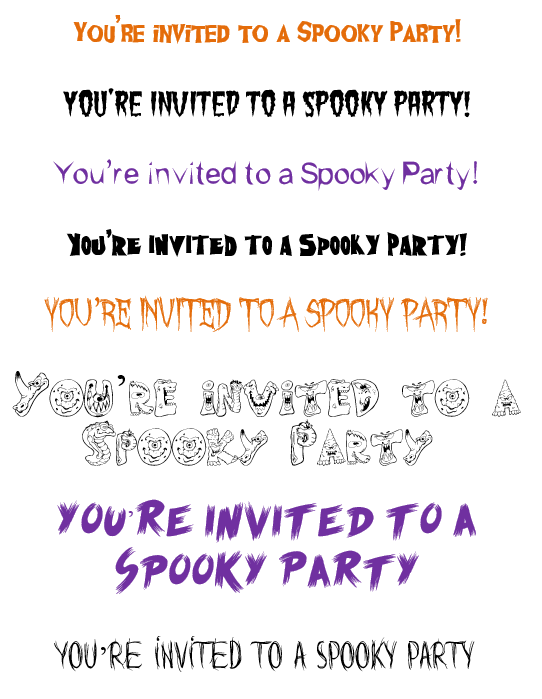
Each of these free spooky fonts is available as a free download from Dafont.com. Here’s what makes each one worth using:
Ghoulish Fright Font
Style: Bold, jagged, horror-inspired lettering with a cracked, distressed texture
Best for: Halloween party flyers, haunted house promotions, event banners
Why it works: High visual impact at large sizes; the rough edges give it a genuinely unsettling quality without sacrificing legibility on headlines.

Green Fuz Font
Style: Fuzzy, organic, creature-like letterforms with a soft, almost mossy texture
Best for: Kids’ Halloween parties, classroom events, playful invitations
Why it works: Friendly enough for family-friendly designs but still unmistakably Halloween — great when you want spooky without scary.

Kishore Sharp Font
Style: Clean, angular, sharp-edged sans-serif with a modern horror edge
Best for: Minimalist Halloween designs, business event promotions, digital flyers
Why it works: More restrained than most Halloween fonts, making it ideal when you want a spooky touch without an over-the-top aesthetic.

NightMare Font
Style: Tall, condensed gothic letterforms with dramatic vertical contrast
Best for: Formal Halloween invitations, masquerade event promotions, posters
Why it works: Feels cinematic and theatrical — this is the font for events that want to feel like a horror movie poster come to life.

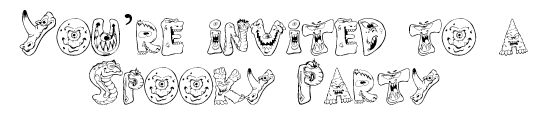
Scary Monsters
Style: Chunky, cartoonish letterforms with monster-themed details and irregular sizing
Best for: Kids’ Halloween parties, school events, costume contest flyers
Why it works: Maximum fun factor — playful and immediately recognizable as festive rather than frightening.
Scream Again
Style: Dripping, blood-effect letterforms with dramatic downward strokes
Best for: Horror event promotions, haunted attractions, adult Halloween parties
Why it works: One of the most visually striking free horror fonts in the list — best used for titles and headlines at large sizes where the drip effect can really land.
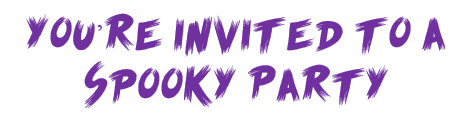
Words Are but Wind
Style: Ethereal, wispy, handwritten script with a ghostly, fading quality
Best for: Elegant Halloween invitations, séance-themed events, mysterious printed pieces
Why it works: Beautifully legible for a decorative font — the flowing, spectral quality makes it perfect for formal invitations that want atmosphere without gore.

How to Install a Free Halloween Font
Once you’ve downloaded your chosen font, installation is quick and straightforward.
Follow these steps:
- Download the font file — it will arrive as a .zip file in your downloads folder.
- Unzip the file — right-click the .zip file and select “Extract All” (Windows) or double-click to open (Mac).
- Locate the font file — look for a file ending in .ttf (TrueType Font) or .otf (OpenType Font).
- Install the font:
- Windows: Right-click the font file → select “Install” or “Install for all users.”
- Mac: Double-click the font file → click “Install Font” in the preview window.
- Open or restart your design program — Microsoft Word, Canva, Adobe InDesign, or any other application will now include your new font in the font dropdown menu.
- Select your font — search for it by name in your font list and start designing.
Tips for Using Halloween Fonts in Invitations and Flyers
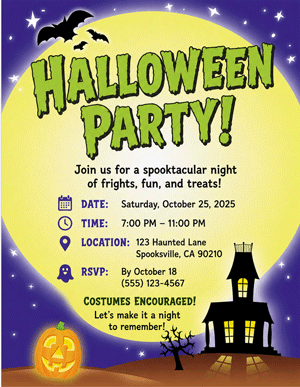
Downloading a great font is only half the equation. Here’s how to use it effectively so your final design looks polished, readable, and intentional.
Font Pairing
Never use two decorative Halloween fonts together — they’ll compete with each other and make your design feel chaotic. Instead, pair your Halloween font with a clean, neutral secondary font:
- Halloween headline font (e.g., NightMare or Scream Again) + clean serif or sans-serif body font (e.g., Georgia, Lato, or Garamond)
- Use your spooky font for titles, headings, and key details only
- Reserve your clean font for all supporting text, dates, addresses, and directions
Readability Rules
- Minimum headline size: 24pt for print; 18pt for digital
- Minimum body text size: 10–12pt for print; 14pt for digital
- Avoid light colors on dark backgrounds for body text — white or cream on black works well; yellow on black can strain the eye at small sizes
- Test print before finalizing — what looks great on a screen can look very different on paper; always run a test print before your full print run
- Limit decorative fonts to 20–30% of your total text — the rest should be clean and highly legible
Font Size Guidelines by Use Case
| Design Type | Headline Size | Body Text Size |
| Invitation (printed) | 28–40pt | 10–12pt |
| Event flyer (8.5×11) | 48–72pt | 12–14pt |
| Banner or poster | 72pt+ | 18–24pt |
| Social media graphic | 48–60pt | 16–20pt |
Designing Your Halloween Invitation: A Step-by-Step Guide
Ready to put your font to work? Here’s how to design a Halloween invitation that looks like it came from a professional — even if you’re doing it entirely yourself.
Step 1: Choose your font combination. Pick one Halloween display font for headlines and one clean, readable font for all supporting details.
Step 2: Set your color palette.
Step 3: Write your content first. Before you design, finalize all text: event name, date, time, location, RSVP details, and any special instructions. Don’t design around placeholder text — it leads to layout problems later.
Step 4: Build your hierarchy. Arrange text by importance:
- Event name (largest, Halloween font)
- Date and time (second largest, clean font)
- Location (same size as date/time)
- RSVP and additional details (smallest, clean font)
Step 5: Add graphics and accents. Complement your font with Halloween-themed graphics — bats, spiderwebs, jack-o’-lanterns, or silhouettes. Keep them in your color palette and don’t let them crowd your text.
Step 6: Check readability one final time. Print a test copy at actual size. If you have to squint to read any part of it — resize, recolor, or rethink.
Specialty Paper Options for Printing
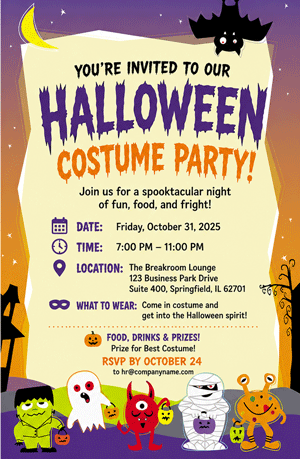
Your font and design deserve to be printed on paper that matches the quality of your creative effort. The right specialty paper elevates a good design into something guests will notice and remember the moment it lands in their hands.
Parchment paper — Aged, textured finish that adds instant atmosphere to gothic or vintage Halloween designs
Matte cardstock — Clean, professional finish ideal for structured invitations; colors print rich and saturated
Glossy paper — Vibrant, high-impact finish that makes bold Halloween colors pop; great for flyers and promotional pieces
Border paper — Pre-printed decorative borders (Halloween themes available) that frame your text beautifully — no graphic design required
Vellum — Semi-translucent paper that creates a ghostly, layered effect; beautiful for elegant or séance-themed invitations
Paper Direct tip: Specialty paper does a lot of the design work for you. A Halloween border paper combined with a single clean font can look more impressive than an elaborate digital design printed on plain copy paper.
Explore Paper Direct’s Halloween paper, border paper, and specialty invitation stock — the perfect match for your free Halloween fonts.
Common Halloween Font Mistakes to Avoid
Even great fonts can go wrong when they’re misused. Here are the most common pitfalls in Halloween design — and how to sidestep them.
- Using a decorative font for body text. Decorative Halloween fonts are designed for headlines and accents only. At small sizes, they become nearly impossible to read. Keep them big, bold, and brief.
- Stacking two decorative fonts. Two display fonts fighting for attention equals visual chaos. Always pair one decorative font with one clean, neutral font.
- Low-contrast color combinations. Dark gray text on a black background, or orange on red — these combinations might look thematic but they’re nearly unreadable in print. Always prioritize contrast.
- Ignoring print vs. screen differences. Colors on screen are backlit and vibrant; printed colors are duller by comparison. If you’re printing, use deeper, richer color values than you think you need.
- Skipping the test print. Always print a test copy before your final run. Font size, color, and paper interaction can all surprise you in print.
- Forgetting to check the font license. Using a font labeled “free for personal use” in a commercial context — like a paid event or a business promotion — can create legal issues. Always verify the license before using any free spooky font commercially.
Frequently Asked Questions
Where can I find free Halloween fonts?
The best sources for free Halloween fonts are Dafont.com, Google Fonts, Font Squirrel, and 1001fonts.com. Dafont.com has the largest Halloween-specific collection and lets you filter by style, popularity, and license type.
Are free Halloween fonts safe to use for commercial projects?
Not always. Many free fonts are licensed for personal use only. Always check the font’s license on the download page before using it in any commercial context. Look for fonts labeled “100% Free” or “Free for Commercial Use.”
How do I install a free Halloween font on my computer?
Download the font’s .zip file, extract it, and find the .ttf or .otf font file inside. On Windows, right-click and select “Install.” On Mac, double-click the file and click “Install Font.” Restart your design program and the font will appear in your font list.
What’s the best font pairing for a Halloween invitation?
Pair one decorative Halloween display font (for headlines and event names) with a clean, readable serif or sans-serif font (for dates, locations, and supporting text). Never use two decorative fonts together — they compete visually and reduce readability.
What paper should I use to print Halloween invitations?
Parchment paper, matte cardstock, and Halloween-themed border paper all work beautifully for printed Halloween invitations. The choice depends on your design’s tone — parchment suits gothic or vintage looks, while glossy cardstock works well for bold, high-contrast designs.
Get Designing — Your Best Halloween Piece Starts Here
Free Halloween fonts give you everything you need to create invitations, flyers, and event materials that genuinely stand out — no design budget required. Pick your font, pair it well, keep your text readable, and print it on paper worthy of the effort you put in.
The right combination of typography and specialty paper turns a great design into something people keep long after Halloween night is over.
Browse Paper Direct’s Halloween paper, border paper, and specialty print stock — the finishing touch your free fonts deserve.
All fonts courtesy of Dafont.com